macOS 看图 · 看视频 · 就地 AI 修改macOS image & video viewer with in-place AI

AI 时代的 Preview。看、改、比,一个窗口。

The Preview for the AI era.View, fix, compare.

打开图片和视频,看清每一处细节。不满意,就在原图上右键用 AI 改;改完和原图并排对比,确认了再用。

Open images and video and see every detail. Not happy with it? Right-click to fix it with AI, right where it is. Then compare the result with the original before you use it.

首次打开无需登录和系统权限No account or permissions to start 14 天完整试用,不绑卡14-day full trial, no card 看图、对比、截图和 OCR 永久免费Viewing, compare, capture and OCR free forever

演示动画,依据 Glance 当前界面设计制作。Demo animation based on Glance's current interface design.

一条主线One loop

看清 → 就地改 → 对比确认

View → fix in place → compare

不用在网页工具、下载文件夹和看图软件之间来回切换。整件事在同一个窗口里完成。

No more bouncing between web tools, your Downloads folder and a separate viewer. The whole job happens in one window.

01

看清每一处细节See every detail

原生 macOS 看图看视频:缩放、平移、多图浏览、视频播放与截帧。可以设为默认看图器,从 Finder 直接打开。

A native macOS viewer for images and video: zoom, pan, browse a folder, play video and grab frames. Make it your default viewer and open straight from Finder.

  • PNG、JPEG、HEIC、WebP、AVIF、GIF、SVG、TIFF 等
  • PNG, JPEG, HEIC, WebP, AVIF, GIF, SVG, TIFF and more
  • MP4、MOV、M4V、WebM、MKV、AVI 视频
  • MP4, MOV, M4V, WebM, MKV and AVI video
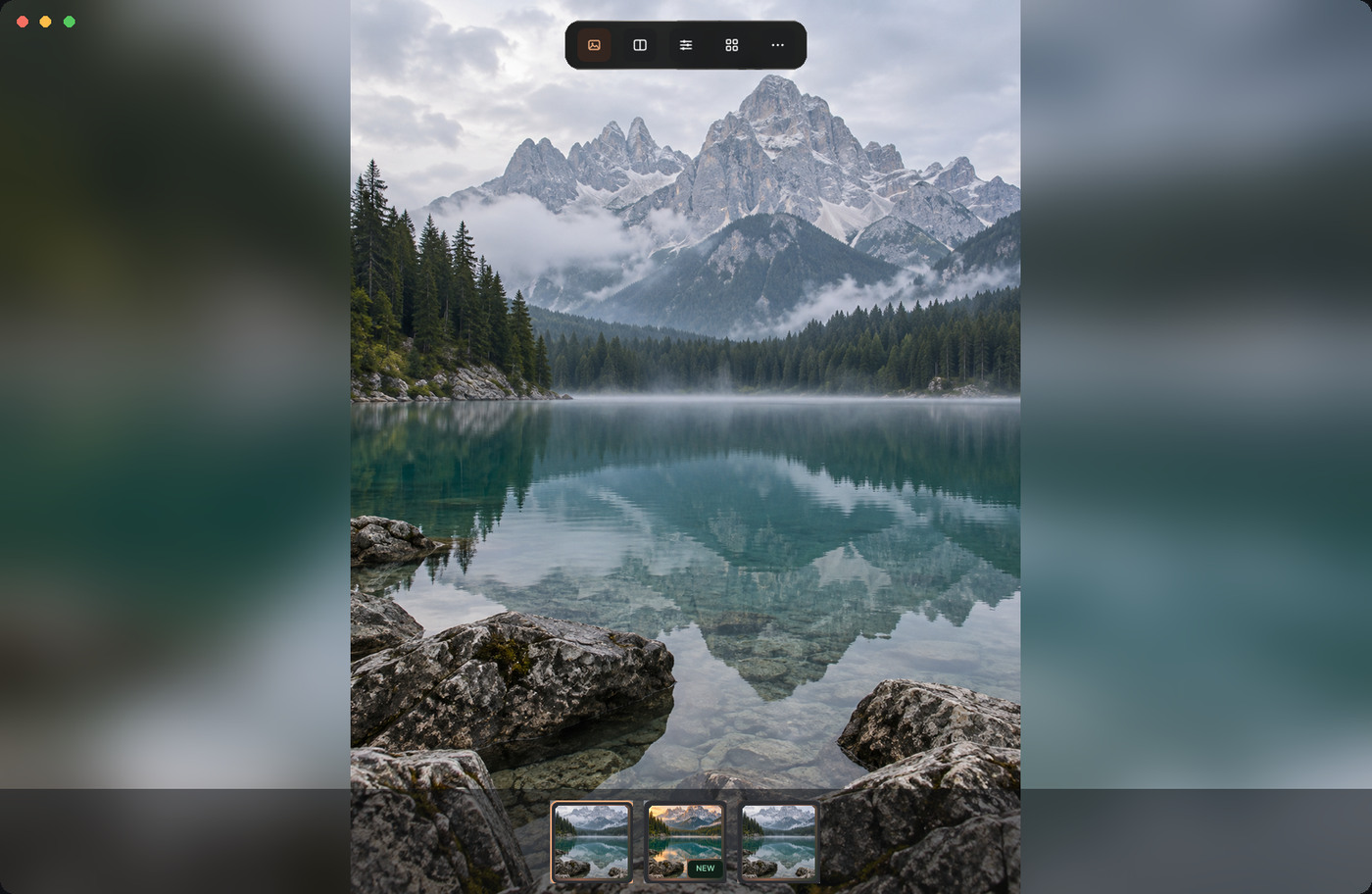
Glance image viewer
02

不满意,就地用 AI 改Fix it with AI, in place

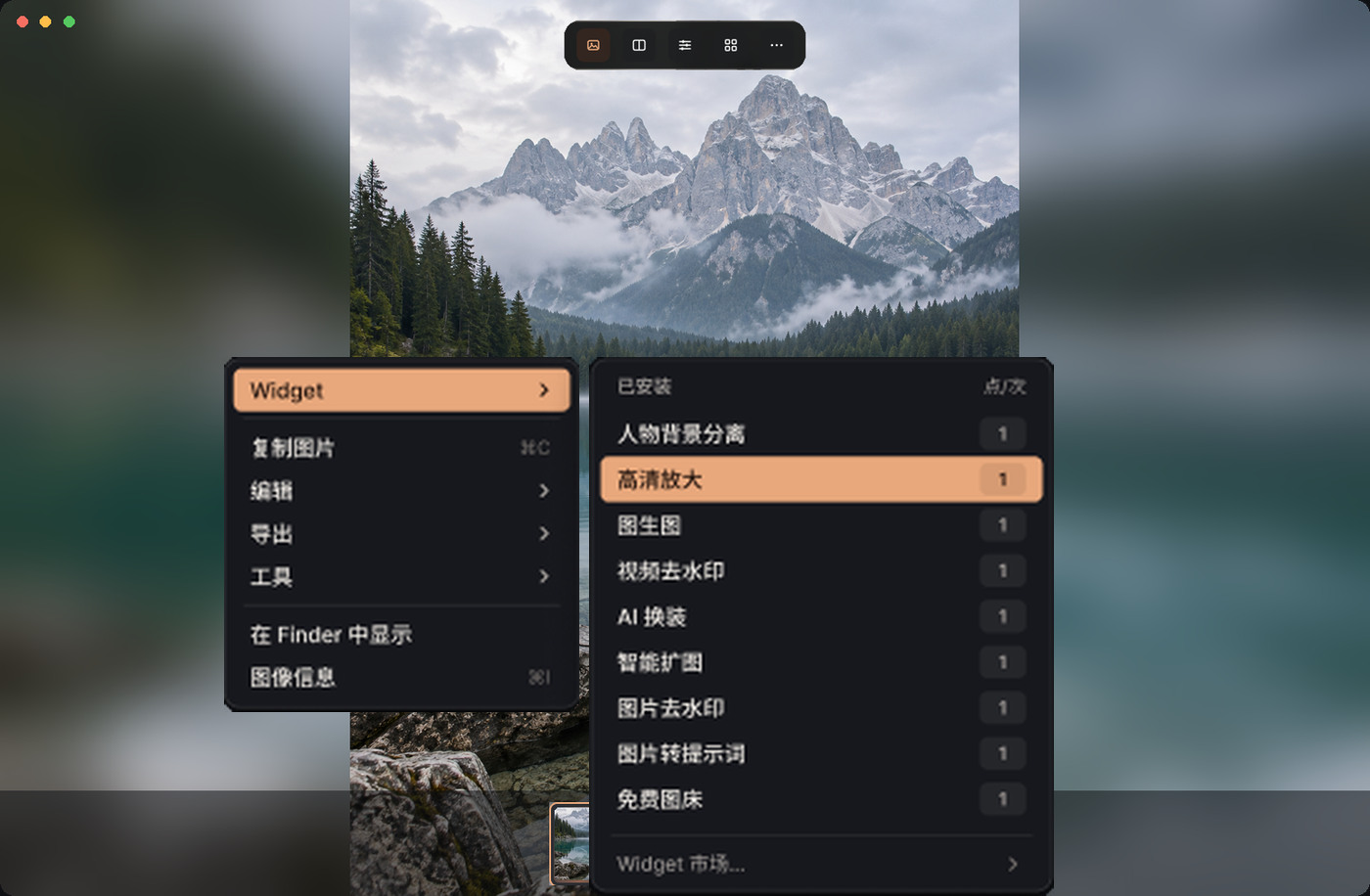
右键选一个 AI Widget:高清放大、智能扩图、人物背景分离……菜单上直接标出每次消耗的点数。结果出现在原图旁边,并自动保存到「下载/Glance」。

Right-click and pick an AI Widget: upscale, outpaint, background removal and more. The menu shows the credit cost of each run. The result appears next to the original and is saved to Downloads/Glance.

  • 任务在后台运行,可以继续看别的图
  • Tasks run in the background while you keep browsing
  • 系统失败或排队超时,自动退回点数
  • System failures and queue timeouts refund credits automatically
Widget menu in Glance
03

对比确认,再决定Compare before you commit

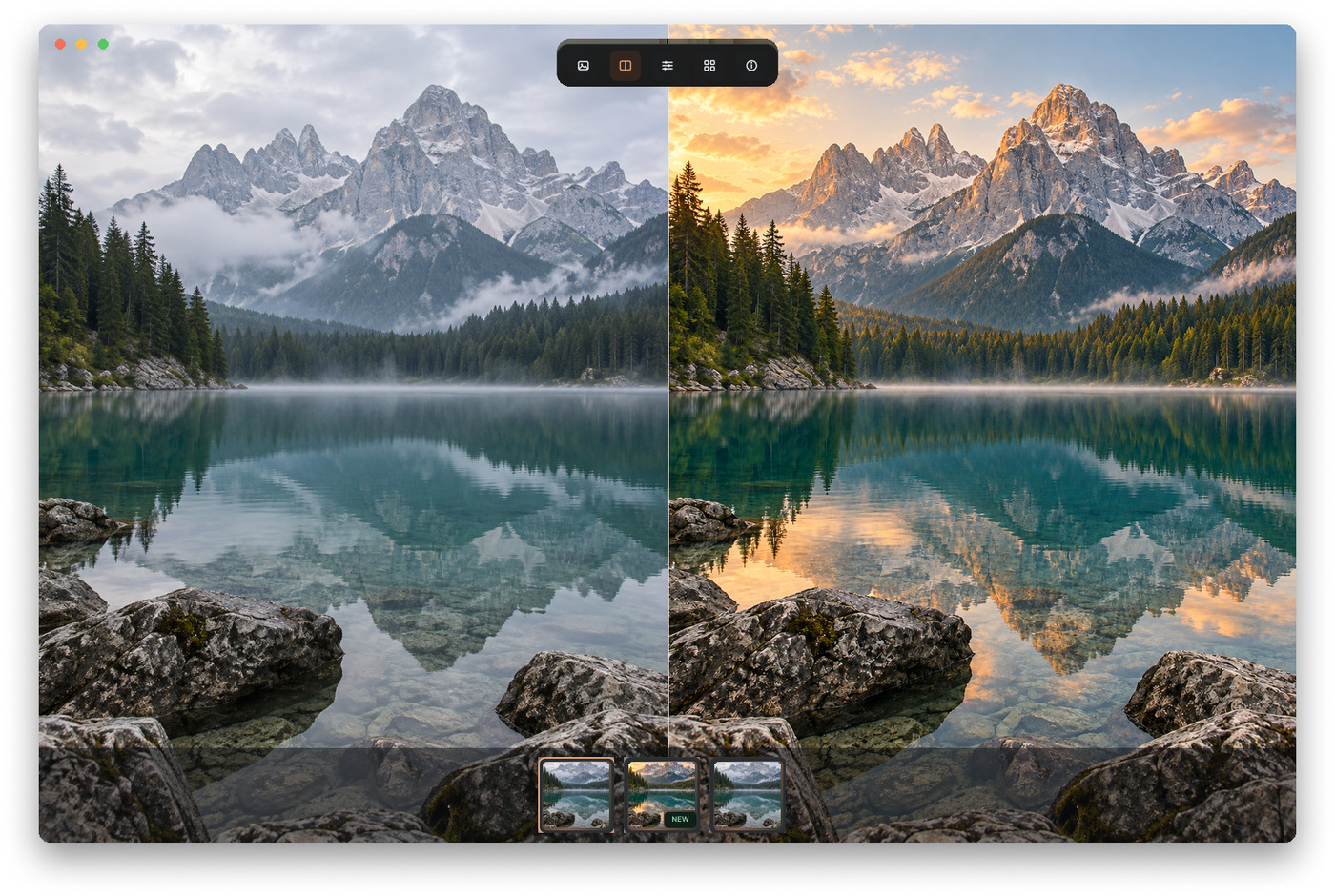
原图和结果并排看,或者用滑杆来回比较。差异一眼看清,确认了再拿去用。

Put the original and the result side by side, or drag a slider between them. See exactly what changed before you use it.

Side-by-side compare in Glance

还有这些

And more

永久免费Free forever

图片里的文字,直接选中复制Select and copy text directly in images

在 Image Inspection 打开图片后,Glance 会在你的 Mac 上自动识别文字。用鼠标拖选、按 ⌘C 复制;也可以在「工具 → 识别文字」里查看完整结果。无需 Pro 或点数,图片不会上传。

Open an image in Image Inspection and Glance recognizes its text on your Mac. Drag to select, press ⌘C to copy, or open Tools → Recognize Text for the full result. No Pro, credits or upload needed.

免费Free

视频预览与截图Video preview & capture

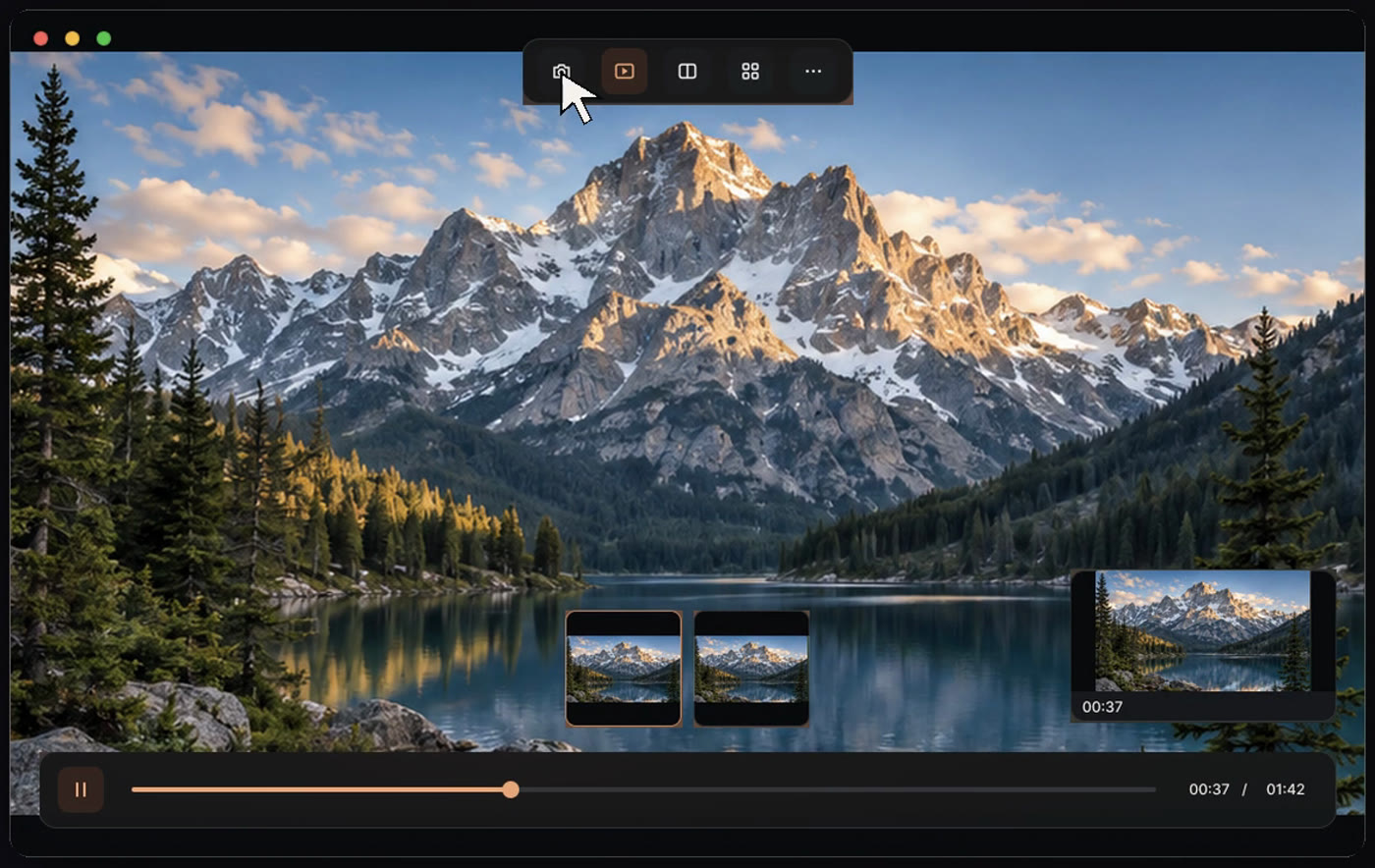
播放视频、停在任意一帧截图,在截图编辑器里裁剪后保存或复制。

Play video, capture any frame, crop it in the capture editor, then save or copy it.

按点数Credits

云端 AI WidgetCloud AI Widgets

新账户赠送 100 点。只为实际运行的云端任务付费,本地功能从不扣点。

New accounts get 100 credits. You only pay for cloud runs; local features never use credits.

Pro

本地工具箱Local toolbox

格式转换、压缩、导出与复制图片、旋转裁剪等编辑、Base64。全部在你的 Mac 上处理,不上传。

Format conversion, compression, export and image copying, rotate and crop edits, and Base64. Everything runs on your Mac and nothing is uploaded.

一次买断,查看价格 →One-time purchase, see pricing →

免费 · 可选Free · optional

Peek

在任意 App 里选中图片链接或文件路径,按 Option + Space 立即预览。默认关闭,需要时在偏好设置中开启。

Select an image link or file path in any app and press Option + Space to preview it. Off by default; turn it on in Preferences when you want it.

免费Free

任务中心Task Center

查看排队、处理中和已完成的 Widget 任务,排队中的任务可以取消并退点。

Track queued, running and finished Widget tasks. Cancel a queued task and get its credits back.

免费Free

零权限起步Zero-permission start

普通 App,带 Dock 和菜单栏图标。首次打开不需要任何系统权限,也不需要账户。

A regular app with Dock and menu bar icons. It needs no system permissions and no account on first launch.

AI Widgets

右键就能用的 AI 工具

AI tools, one right-click away

价格按次计,直接来自 Glance 服务,与应用内显示一致。

Prices are per run and come straight from the Glance service, exactly as shown in the app.

查看全部 Widget 与模型说明All Widgets and model details

价格Pricing

免费看,Pro 一次买断,AI 按次付费

Free to view. Pro is one purchase. AI is pay-per-run.

免费版Free

¥0,永久$0, forever

查看图片和视频、对比、截图,以及按点数使用 AI Widget。

View images and video, compare, capture, and use AI Widgets with credits.

Glance Pro

一次买断,不订阅One-time, no subscription

解锁全部本地工具箱,含 12 个月功能更新,可在 2 台 Mac 上使用,附赠 100 点。

Unlocks the full local toolbox with 12 months of updates, use on 2 Macs, plus 100 bonus credits.

点数Credits

按需充值,长期有效Top up as needed

¥1 = 10 点。点数不过期,同一账户的 Mac 共享。没有自动续费。

Credits never expire and are shared across your Macs. Nothing renews automatically.

查看完整价格与对比Full pricing and comparison

下载Download

免费下载内测版

Download the free beta

内测版尚未经过 Apple 公证,第一次打开需要在「系统设置 → 隐私与安全性」里放行一次。

The beta is not yet notarized by Apple. Allow it once in System Settings → Privacy & Security the first time you open it.

版本Version
1.0.0-beta.1
大小Size
5.0 MB
系统Requires
macOS 12.3 及以上,Apple 芯片(M 系列)macOS 12.3 or later, Apple silicon (M-series)
SHA-256
aad58a57f4e157fecc311746d3b69e36a88fec75587a4ad844e036e940622c95

常见问题

FAQ

需要登录吗?Do I need an account?

不需要。看图、看视频、对比和截图都不需要账户。只有第一次使用云端 AI Widget 或购买时,才需要用 Google 或邮箱验证码登录。

No. Viewing, compare and capture work without an account. You only sign in, with Google or an email code, the first time you run a cloud AI Widget or make a purchase.

我的文件会被上传吗?Are my files uploaded?

不会。查看和本地工具都在你的 Mac 上处理。只有当你主动运行一个云端 Widget 时,你选中的那张图片或那段视频才会上传处理。

No. Viewing and local tools run on your Mac. Only when you run a cloud Widget is the media you selected uploaded for processing.

Pro 是订阅吗?Is Pro a subscription?

不是。Pro 一次买断,已获得的版本永久可用,包含 12 个月功能更新。之后想要新功能,可以自愿续购一年更新,不会自动扣款。

No. Pro is a one-time purchase. The versions you get are yours to keep, with 12 months of feature updates included. After that you can optionally buy another year of updates; nothing renews automatically.

任务失败了会扣点吗?Am I charged if a task fails?

系统失败、排队超过 30 分钟、或在开始处理前取消,点数都会全额自动退回。任务开始处理后由你主动取消,点数不退。

If a task fails on our side, waits more than 30 minutes in the queue, or is cancelled before processing starts, its credits are refunded in full automatically. Cancelling after processing has started is not refunded.

试用结束后还能用什么?What still works after the trial?

查看图片和视频、对比、截图、图片文字识别与复制,以及按点数使用 AI Widget 继续免费。格式转换、压缩、导出、复制图片、编辑和 Base64 工具需要 Pro。你的文件、结果和点数都不受影响。

Viewing, compare, capture, image text recognition and copying, and credit-based AI Widgets stay free. Conversion, compression, export, image copying, editing and Base64 tools need Pro. Your files, results and credits are untouched.

怎么付款?How do I pay?

在应用内选择商品后,会打开 Pancake by Waffo 的安全收银台。人民币订单使用微信支付;美元订单可以用银行卡、Apple Pay、Google Pay 或微信支付。

After you choose a product in the app, Pancake by Waffo's secure checkout opens. CNY orders use WeChat Pay; USD orders accept cards, Apple Pay, Google Pay or WeChat Pay.